Wine label scanning and Premium
First of all
I realise that the blog posts, and the Piedmont series in particular, have been falling a little behind schedule. That's mainly because I've been busy working on several new features and improvements. So bear with me!
Wine label scanning
One of the new features is wine label scanning. When adding a bottle to your collection, you now have the option to scan a wine label using your phone's camera or upload a picture from your PC. Wineventory will then automatically fill in as many fields as it can based on the information found on the label.
You can find the wine label scanning feature in the following places:

Click here to add a bottle to your collection. The pop-up below will open.
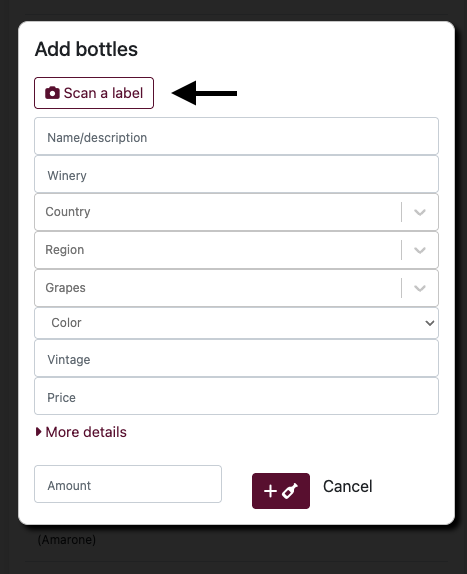
Click the button to scan a label and have the available fields filled in automatically.
Even when a label contains very little information, Wineventory will try to identify the wine and look for additional details where possible.
To make this work, I rely on external APIs and services, which come at a cost. Every label scan costs me money, on top of the costs of hosting and maintaining Wineventory itself.
Introducing Wineventory Premium
That's why I'm introducing Wineventory Premium.
For free-tier accounts, wine label scanning will be disabled. If you'd like to use this feature, you can subscribe to Wineventory Premium for €4.95 per month, with the option to cancel at any time.
You can subscribe directly from the Settings screen.
I'll also be introducing other advanced features in the future. Of course, I'll continue improving the free version of Wineventory as well. I believe introducing a Premium tier is a necessary step to make sure I can keep maintaining, developing and improving the platform in the long run.
Do you have any questions or feedback? Don't hesitate to contact me at admin@wineventory.net.
Cheers,
Thomas